Product
0 min read
Your baby’s complete sleep story — introducing Upgraded Sleep Insights


Cradlewise Staff
At Cradlewise, we’ve been listening closely.
Over the past year, thousands of parents have told us the same thing:
“I love seeing my baby’s sleep, but I want to understand it better.”
Not just how long your baby slept, but why the day felt easy or hard.
Not just when they woke up, but what changed from yesterday.
Because when you’re tired, you don’t want more data. You want something that makes things feel clearer.
So we went back to the drawing board and rebuilt the Sleep tab from the ground up.
We’re so excited to introduce Sleep Insights V2, a more thoughtful way to understand your baby’s sleep. One that helps you see the full picture, across days, weeks, and months, so you can feel a little more confident in the rhythms you’re building.
Three new ways to view your baby’s sleep
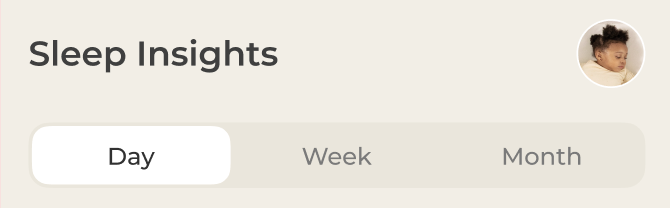
Sleep Insights is now organized into three simple views: Day, Week, and Month.
As you can see in the new tab layout, switching between them is seamless and intuitive .
Each view gives you a different perspective:
- Day view helps you understand what just happened
- Week view helps you notice patterns
- Month view helps you step back and see growth
When you look at sleep this way, it starts to feel less random and more predictable.
Day view: Everything about today’s sleep, at a glance
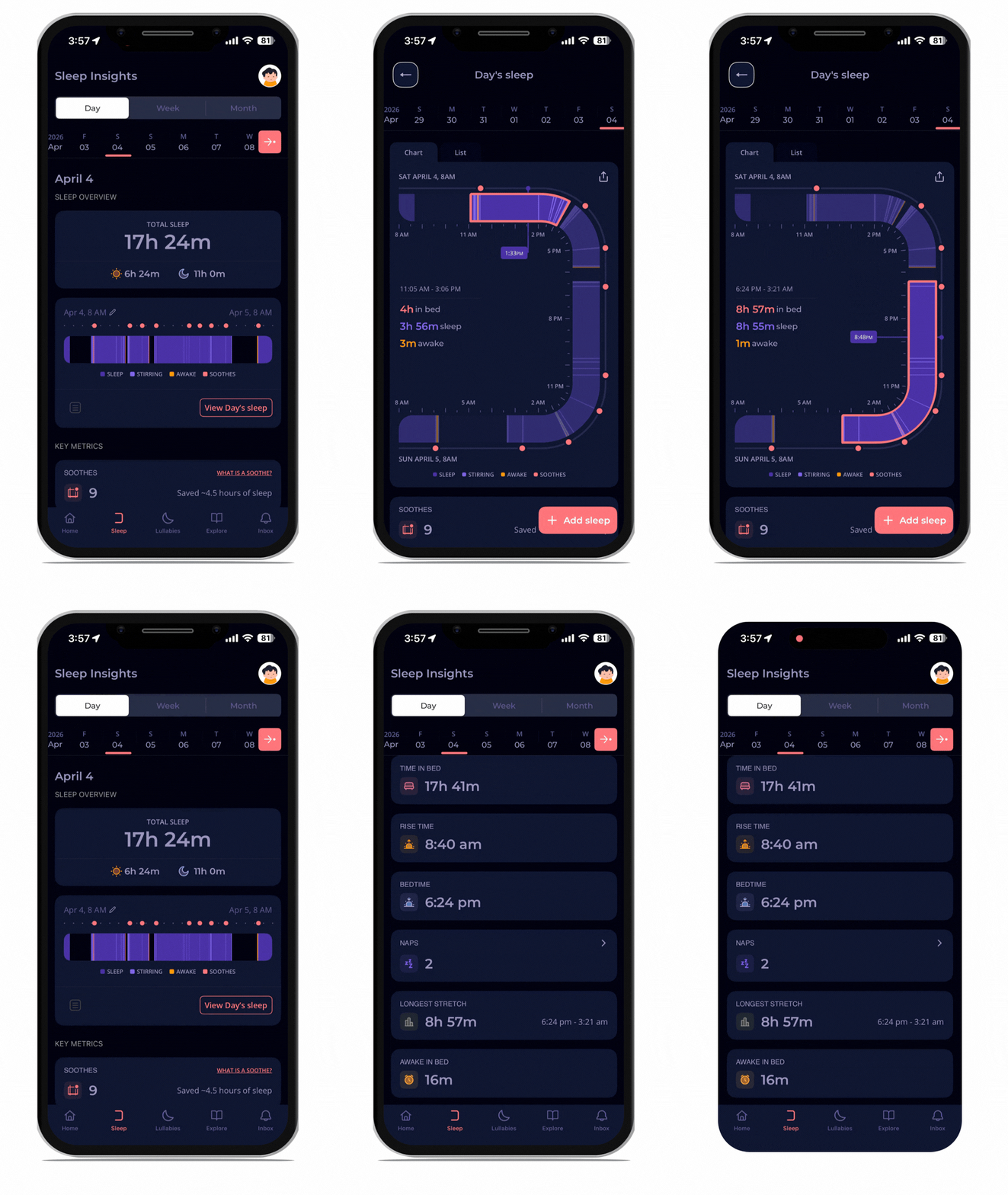
- Sleep overview
Right at the top, you’ll see your baby’s total sleep, clearly split into day sleep and night sleep, just like in the overview card in the design.
Below that, you’ll find key details like:
- Bedtime
- Rise time
- Number of naps
- Longest stretch
- Time in bed
- Awake time
- Soothes
These are the small details that shape your baby’s day.
Instead of wondering “why was today off?”, you can now see what actually changed. Maybe bedtime shifted. Maybe naps were shorter. Maybe the longest stretch got better.
And slowly, those patterns begin to click.
2. Your favorite sleep chart is now more interactive
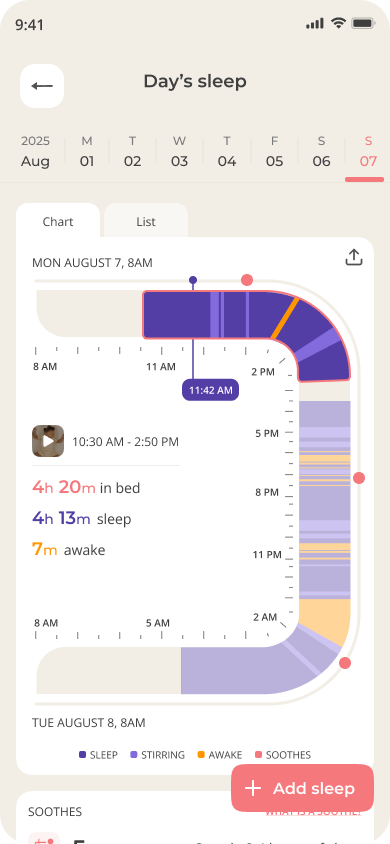
The inverted C chart that you already know and love? Tap on the ‘View Day’s sleep’ card to check it out.
Now tap anywhere on the chart to see the start and end times of each sleep chunk, along with:
- time spent in crib
- sleep time
- awake time
Earlier, you had to scroll and estimate. Now, the information comes to you with a single tap.
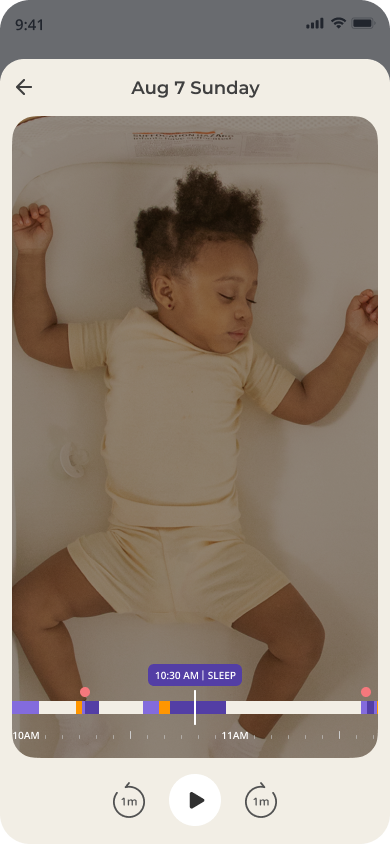
And if you’re trying to understand a tricky wake-up, you can go deeper by opening the video summary for that moment.
Because sometimes, a quick look at what happened tells you more than numbers ever could.
3. List view
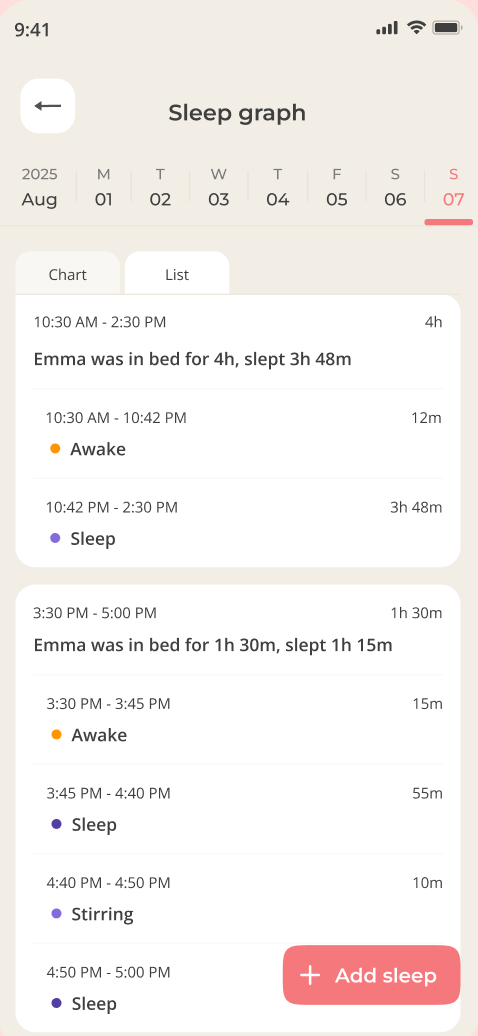
Not every parent wants to read a chart, especially in the middle of the night.
We’ve added a list view that lays out your baby’s sleep sessions top to bottom — like a calendar.
You can see:
- When your baby went down
- When they woke up
- How long each stretch lasted
It feels familiar, almost like reading a daily log, and helps you quickly understand the flow of the day without thinking too hard.
Tap the ‘List’ tab at the top of your sleep graph to switch between chart and list views. It’s a quick way to eyeball the day’s sleep at a glance.
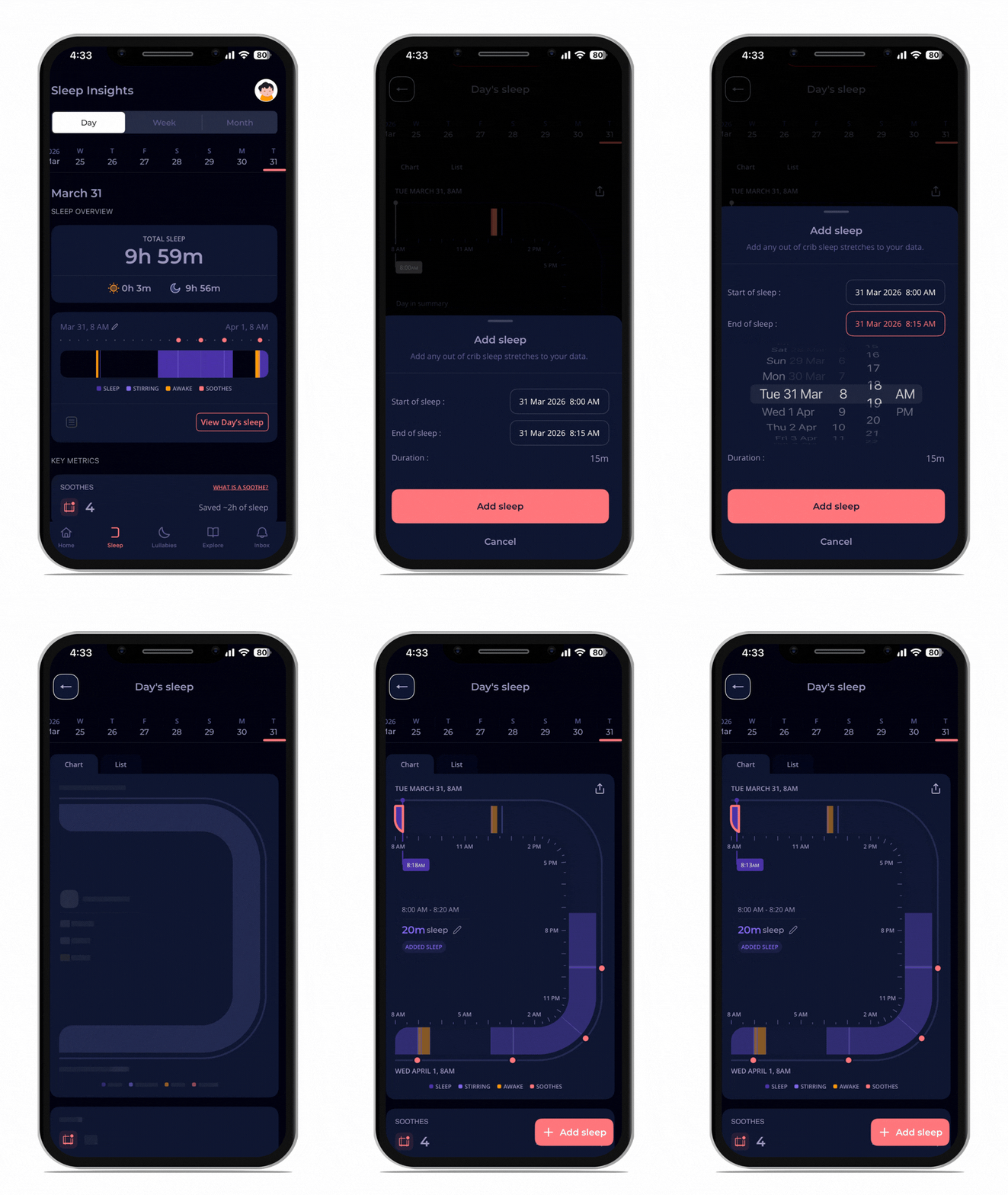
4. Add out-of-crib sleep
Life doesn’t always happen inside the crib.
Some naps happen on the go. Some happen in your arms. Some happen when you least expect them.
Now you can log those naps by tapping the ‘+ Add Sleep’ button in the bottom right corner of the C-chart or list views. You can add sleep for up to 15 days in the past, and everything updates automatically.
That means your baby’s sleep finally reflects their real day, not just the parts the crib could track.
5. Customizable day start time
Every baby’s day begins a little differently. Some babies are early risers. Others take their time.
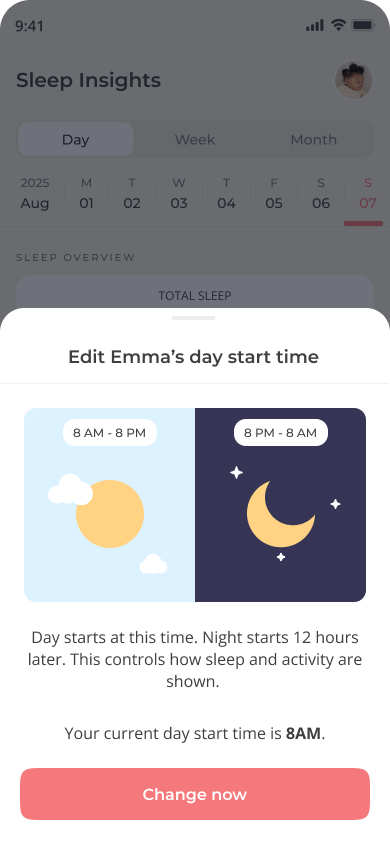
By default, Cradlewise uses an 8 AM to 8 AM sleep day. But if your baby consistently wakes closer to 9 AM, that default may not fit.
Now, you can ‘set your own day start time’ and all your charts, metrics, and totals will automatically recalibrate to match your baby’s natural rhythm. Just tap the edit icon next to the date on your Day view.
Once you do, everything adjusts:
- Daily totals
- Charts
- Sleep summaries
This makes your data feel more aligned with your baby’s natural rhythm.
Because when your data reflects real life, it becomes much easier to trust.
Week view: Spot patterns, plan better
One day can feel unpredictable. A week tells a clearer story.
6. Weekly trends
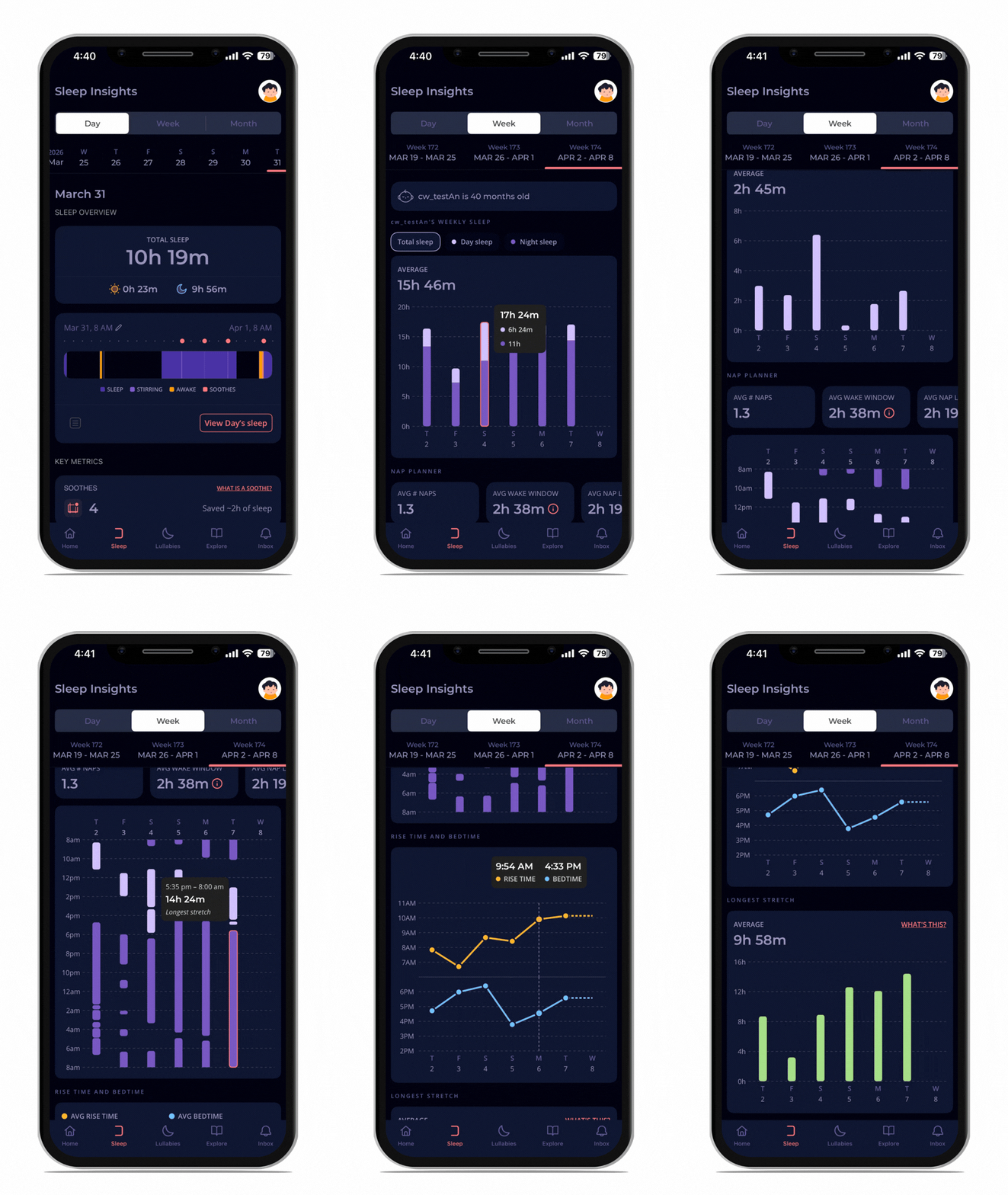
In the Week view, you can see how your baby’s sleep is changing over time through simple visual charts.
The Week view gives you **trends for all your key sleep metrics**
You can track:
- Total sleep
- Day and night sleep
- Bedtime and rise time
- Longest stretch
You can also tap into specific metrics to focus on what matters most. This helps you connect the dots.
You can drill into the details — for example, see how a shift in bedtime affected total night sleep, and use that to plan a better routine. It’s the kind of context that turns data into decisions.
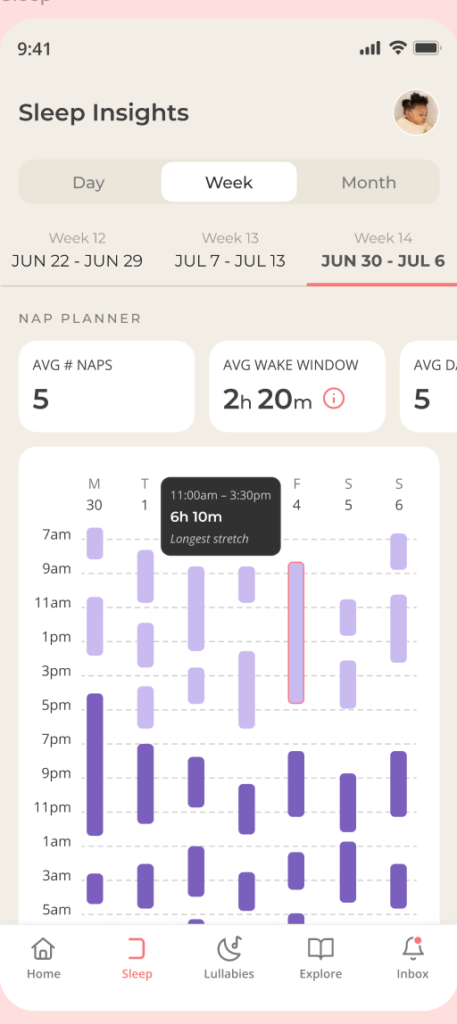
7. Nap Planner
The Nap Planner, visible below the weekly charts, brings together your baby’s daytime sleep patterns in one place.
It shows your baby’s
- Average number of naps
- Average wake window
- Average nap duration
Over time, you begin to notice a rhythm.
You might see that naps tend to happen around the same time each day. Or that a missed nap shifts everything later.
And that makes it easier to plan your day with a little more confidence, and a little less second-guessing.
Month view: See how sleep grows with your baby
When you step back even further, something else becomes visible—progress.
8. Age-wise sleep trends
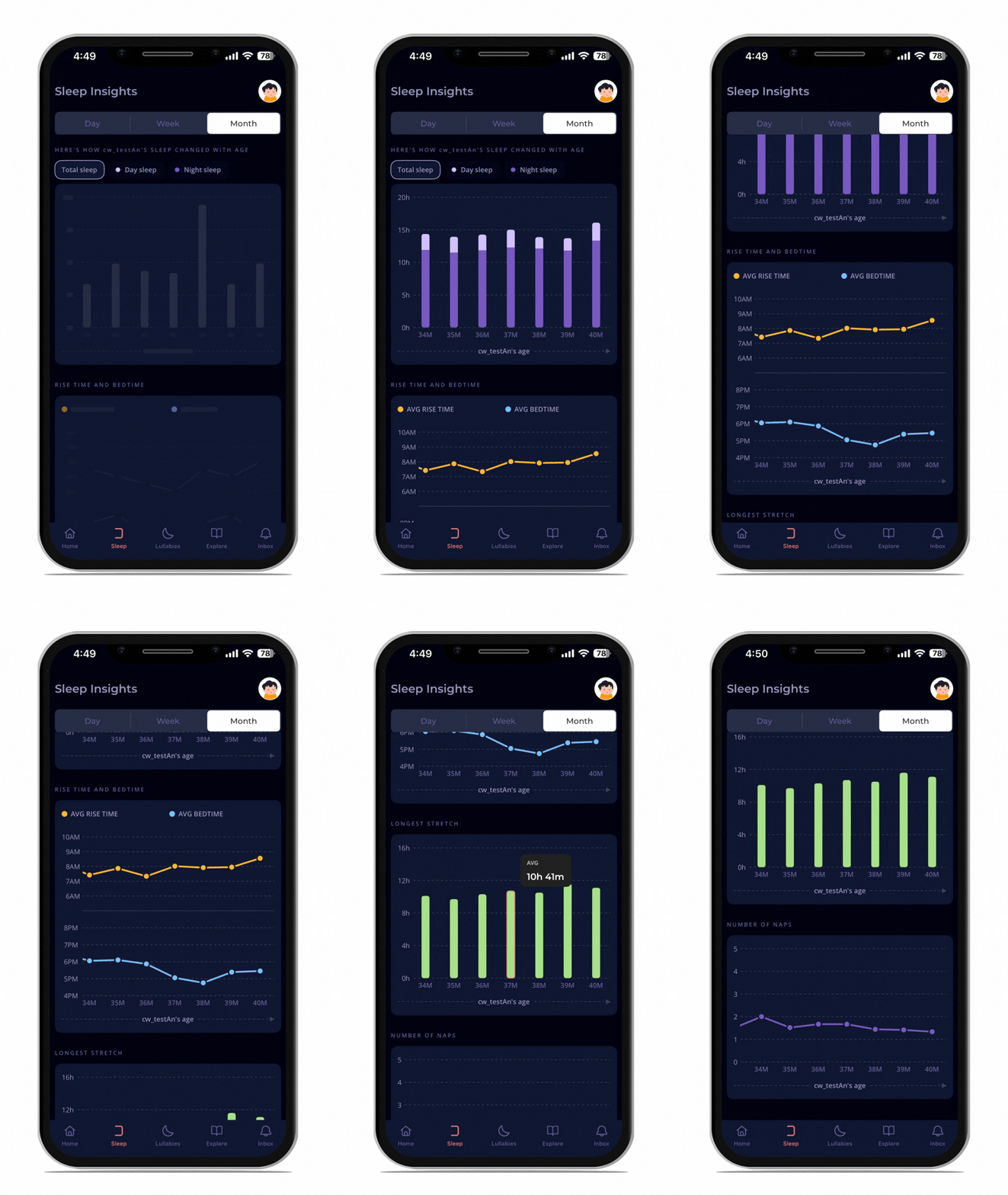
The Month view zooms all the way out. You’ll see how your baby’s sleep has changed with age.
You’ll see trends in:
- Total sleep
- Longest stretch
- Bedtime and rise time
- Number of naps
All mapped to your baby’s age.
This is where many parents find reassurance.
You start to see that longer stretches are forming. That routines are settling. That things are moving forward, even if it didn’t feel like it day to day.
It’s a bird’s-eye view of your baby’s sleep journey and a reassuring way to see just how far you’ve both come.
A clearer, calmer way to understand your baby’s sleep
Sleep Insights V2 brings everything together in one place.
It helps you:
- Understand what happened
- Notice what’s changing
- And feel more confident about what to do next
Because when sleep starts to make sense, everything else feels a little easier.
And sometimes, that clarity is exactly what you need. 💛


You may also like


